






6-MINUTE GUIDE
6-Minute Workstation Quickfix
How to configure your workspace like a pro. Four adjustments, nothing to buy.
Protocol by Anthros OTs and PTs · Presented by Dr. Mike Wasilisin, DC
Before You Start
Check Three Things Right Now
Before you change anything, take ten seconds and see where you actually are.
Most people miss two of the three.
Fix Yo Chair
The Chair Allows Posture Collapse
Most chairs don't support your pelvis or thoracic spine properly, so you slowly sink into poor posture. Everything below this fix sits on top of it.
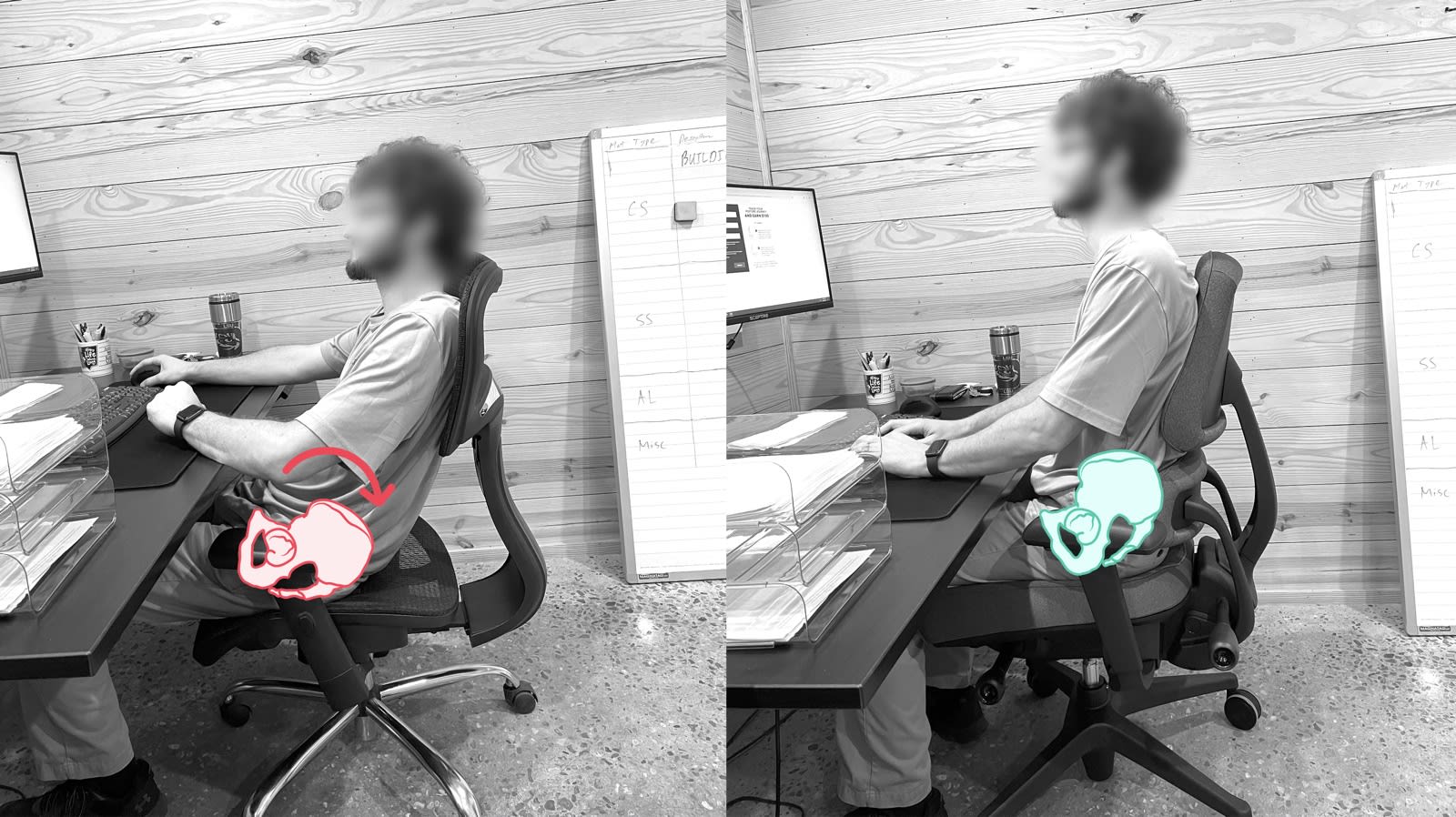 Before After
 Solution: Get Your Foundation Right
Sit all the way back. Lift your pelvis upright so you feel your sit bones. Then support it there, low at belt level, not up at your mid back.
Quick Fix
A firm pillow or rolled towel behind your pelvis, plus a small thoracic pillow to keep your upper back upright. Add a seat cushion if you feel pressure.
Real Fix
A chair that supports the pelvis directly instead of asking a towel to do it. Setup instructions at the bottom.
Presented by Dr. Mike Wasilisin, DC, MoveU
Fix Yo Desk Height
Desk Height Forces Compensation
Standard desks are built taller than most people need, which keeps your shoulders quietly shrugged and pulls you into a forward posture. This sets the height everything else has to work around.
Solution: Fix Your Desk and Your Feet
Pull your chair as close to the desk as you can. Lower the desk or raise your chair so your elbows are at 90° with relaxed shoulders and forearms parallel to the floor. Feet flat on the floor or a footrest, thighs parallel to the ground.
Quick Fix
A keyboard tray attached to your desk, which lets your seat sit closer to the floor while your arms stay at the right height.
Real Fix
An adjustable height desk that actually goes low enough for your body.
Fix Yo Keyboard
Peripherals Create Shoulder, Arm, and Wrist Strain
Peripherals placed too far away force you to reach and roll your shoulders forward, bend your wrists out of neutral, and load your shoulders, forearms and wrists all day.
Solution: Remove the Strain
Pull your keyboard and mouse close to your body with wrists and hands neutral. The goal is elbows directly under your shoulders with your arms relaxed and forearms parallel with the desk.
Quick Fix
A laptop riser with a Bluetooth keyboard and mouse combo. Adjust armrest height so shoulders stay down and elbows stay close.
Real Fix
An ergonomic keyboard and mouse that keep your wrists straight and forearms in a neutral rotation.
Fix Yo Monitor
Monitor Position Encourages Forward Head Posture
When your screen sits too low or too far away, your neck drifts forward and your upper back carries the load all day. Quickest fix here, and you'll feel it within a minute.
Solution: It's the Distance
Your monitor should sit one arm's length away. Eye level should hit the top third of the screen, with your gaze angled slightly downward, 10 to 20 degrees.
Quick Fix
Stack books or a ream of paper under the monitor until the top third meets your eye line.
Real Fix
A monitor arm, so the position holds instead of you rebuilding the stack every few weeks.
All 4 steps done
Ready to make it stick?
All Four Done? Run the Check Again.
Feet flat. Elbows at 90. Screen at arm's length. It should feel different than it did six minutes ago.
Back to the CheckCredentials
Who Built This

Ashley Williams, PT, DPT, ATP/SMS, CASp
Ambassador Community Director at Anthros

Stacey Mullis, OTR/L, ATP, CPS-NPI
Director of Education & Clinical Marketing at Anthros

The Testing Behind It
Independent lab testing at the University of Waterloo measured pelvic tilt and thoracic flexion across seated positions.
Pressure mapping at the University of Pittsburgh was conducted to the ISO 16840-6 standard.
Want the one-page version?
Get the printable checklist so you can run this again next week.
Have Questions? Book a Free Posture Call
Schedule a complimentary 1:1 video call with one of our on-staff therapists. Show us your desk and we'll tell you what to change.
Book a Free Call
FAQ
Questions People Ask
Does this work with a standing desk?
Yes, and the same checks apply standing. Elbows at 90, screen at arm's length, weight even through both feet. The pelvis fix applies to the seated half of your day.
What if my desk doesn't go low enough?
Most don't. That's why the desk fix is raising your chair or adding a keyboard tray, and making sure your feet are firmly supported on the ground or on a footrest. This solution gets you the same elbow and shoulder position without touching the desk.
I only use a laptop. What changes?
A laptop puts your screen and keyboard at the same height, so one of them is always wrong. Raise the laptop to eye level and add a separate keyboard and mouse. It's the single biggest change a laptop-only setup can make.
How long before I notice a difference?
The monitor and keyboard changes are immediate, since you feel your neck and shoulders settle very soon. The seated position takes longer to feel normal, because you're changing a habit your body has held for years. Most people notice a difference in how they sit within a few days.
The Chair
Already Have an Anthros?
Two minutes to set it up properly. Most of the chair's advantage is in the pelvic support, and it only works when it's positioned for your body.
- Reset both back supports.
- Sit deep, lift your pelvis upright, and rotate the pelvis support until it holds you there.
- Bring the upper backrest forward until it gently supports your upper torso. Adjust until your muscles can fully relax.
- Activate Decompress Mode by unlocking the tilt and adjusting tension to match your body.
- Raise the seat until your elbows reach 90 degrees at the desk, and support your feet if they aren't flat.
Still Not Comfortable?
If these points don't get you sitting properly, reach out to one of our posture therapists — they'll get you set up right.
Book a Free Posture Call